Skip to contentFree NetRay WISE™ warehouse assessment — get your score, AI insights and PDF in 10 minFree warehouse assessment →
NetRayDiscuss a workflow
Connected packing, verification and traceability

Smart Packing Stations with Order-Linked Video

Bring scanning, label printing and order-linked packing video together at one workstation. Start with W8 and PackEye for packing records, or configure a complete bench around your warehouse workflow.

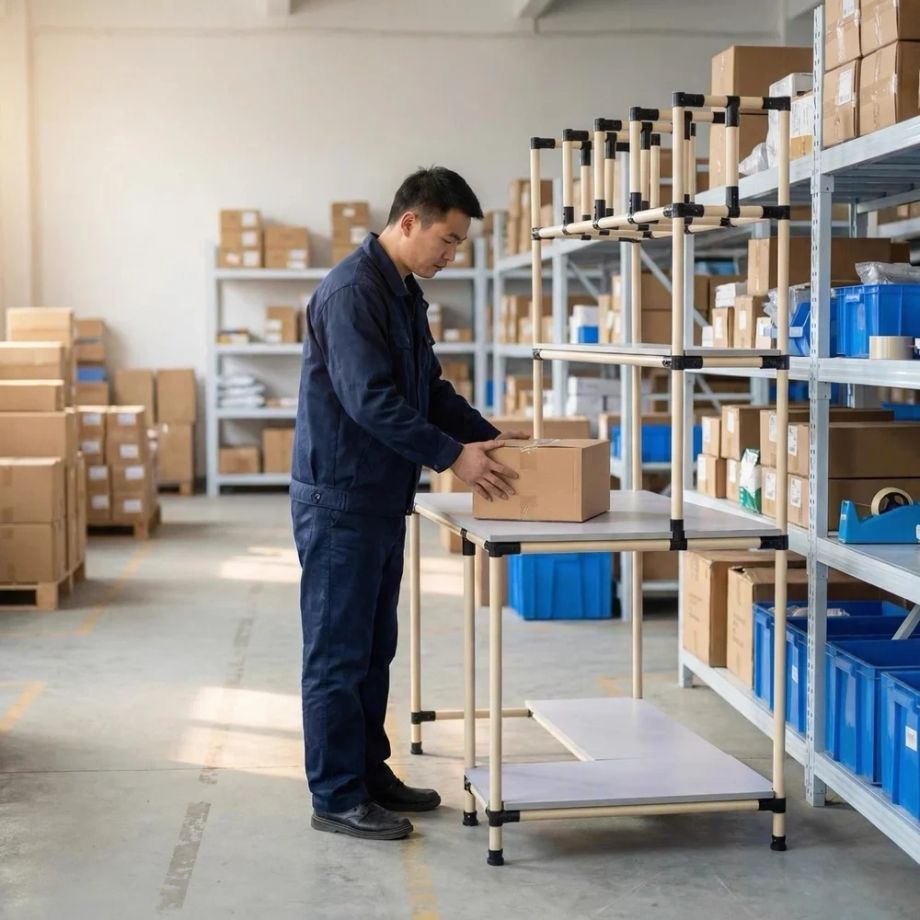
Operator packing a carton at a modular bench
Operator at a modular bench. Scanner, camera, printer and software are configured around the station. This photo does not show every module.

What each part does

Item matching is handled by your WMS or verification software; W8 and PackEye record the packing process.

For automatic bagging and labeling, see the packing machines

ComponentRole
Barcode scannerRead order and item barcodes
Order verification software / WMSMatch scanned items to the order, where that match is configured
W8 + PackEyeRecord and retrieve packing footage by reference
Label printerPrint shipping labels
Workbench and materialsOrganize packing tasks and protect products

How the Smart Packing Station works

Six steps from order to dispatch. Recording and item matching happen only when those parts are configured and used.

Scan or enter the order or waybill number
Start the linked packing recording in PackEye
Scan item barcodes. Matching them to the order is done in the WMS, ERP or verification software, where that is configured — not by the camera
Pack and protect the products
Print and apply the shipping label
Retrieve the recording later by reference, when a recording was completed

Packing Station Components

Every station is configured from these building blocks — start with what your workflow needs most:

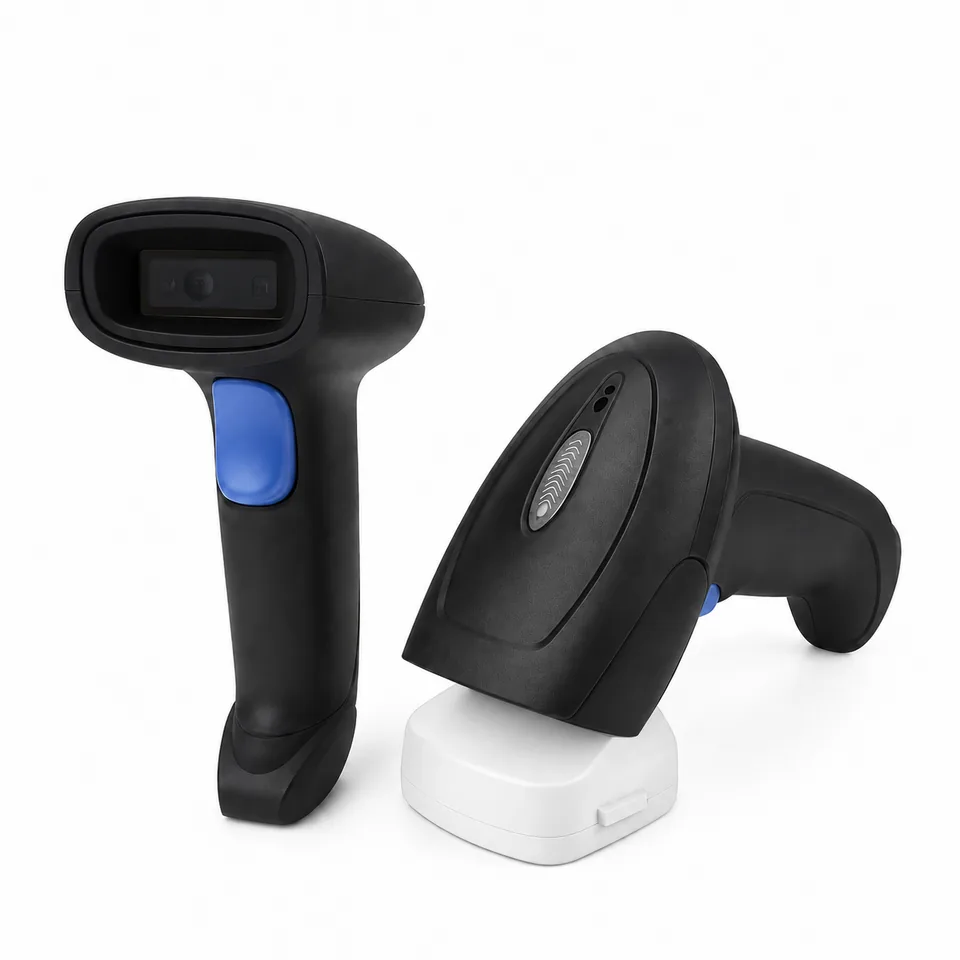
Two views of the NetRay NX2 wireless barcode scanner, including one seated in a base.

Barcode Scanner

Scan order numbers, item barcodes and shipping references during the packing workflow. NetRay NX1 / NX2 wired or wireless imagers, Mindeo CR40 ring scanner for hands-free scanning during packing, or N75 / MC62 PDA for mobile operators.

PDA & scanner specs
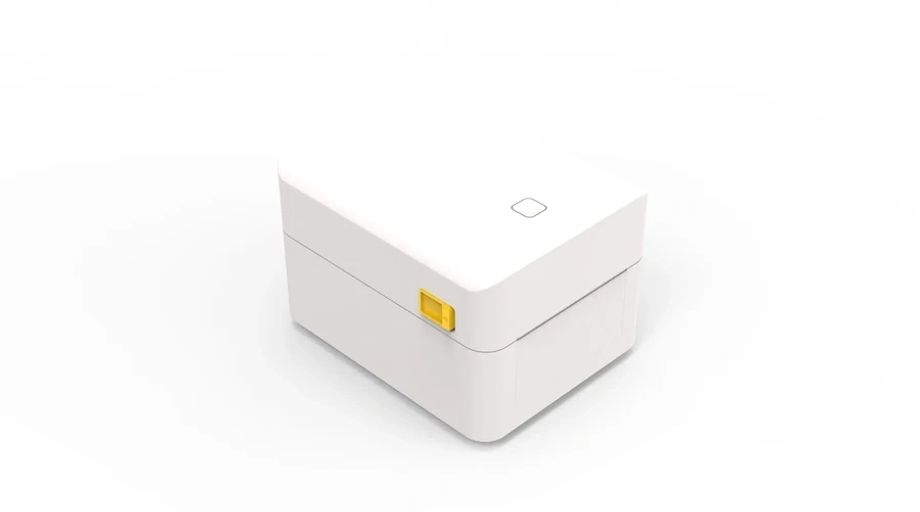
NetRay T45 shipping label printer for the packing station

Shipping Label Printer

Print shipping labels and order documents at the packing station. NetRay T45 (USB + Bluetooth, 203 DPI) or iDPRT iD4S (USB + WiFi, ZPL, 300 DPI). 20–108 mm is the published media width. Speed is listed at 150 mm/s for both; other specifications stay with the model they were published for.

Ask about label printers
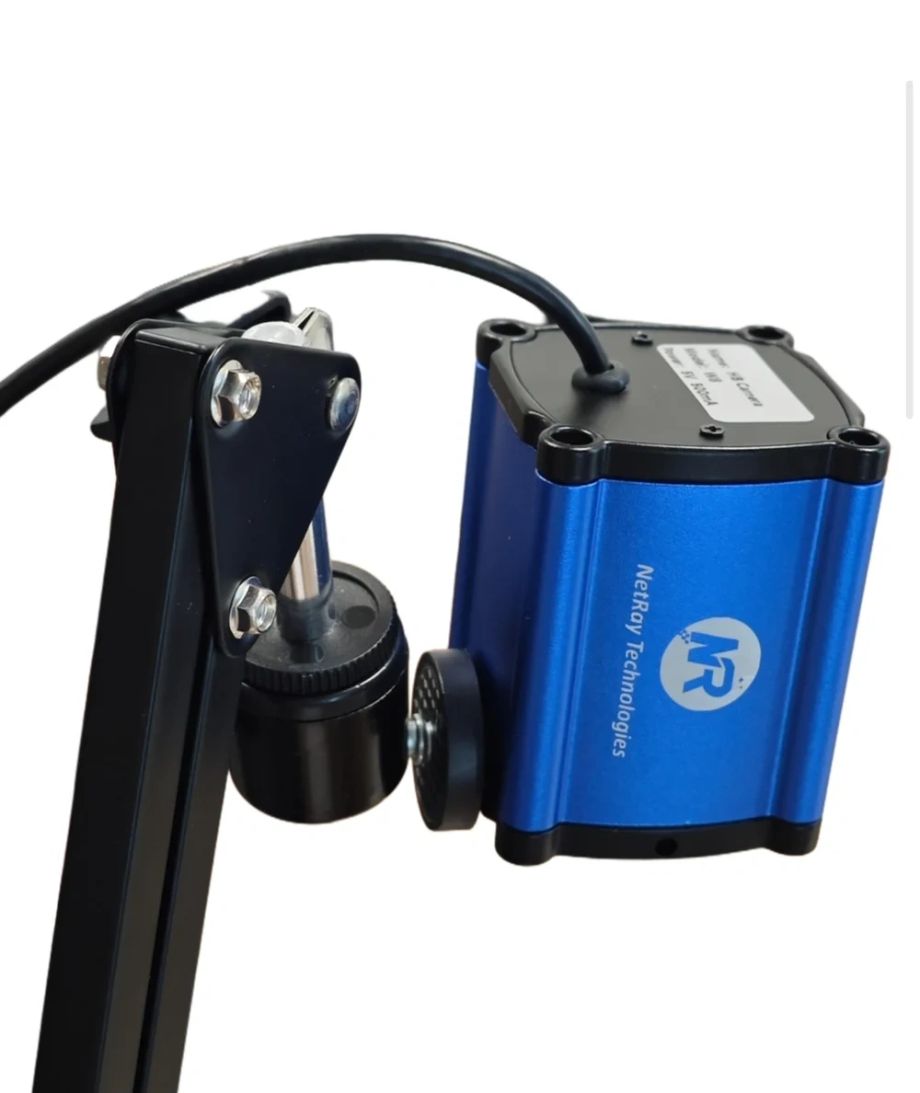
NetRay W8 packing verification camera — 12MP USB-powered camera

W8 Packing Webcam

Record packing video for traceability and claim investigation when recording is started for that order. 12MP is the camera sensor. Video resolution and frame rate are separate and are confirmed in the project specification.

How W8 + PackEye works
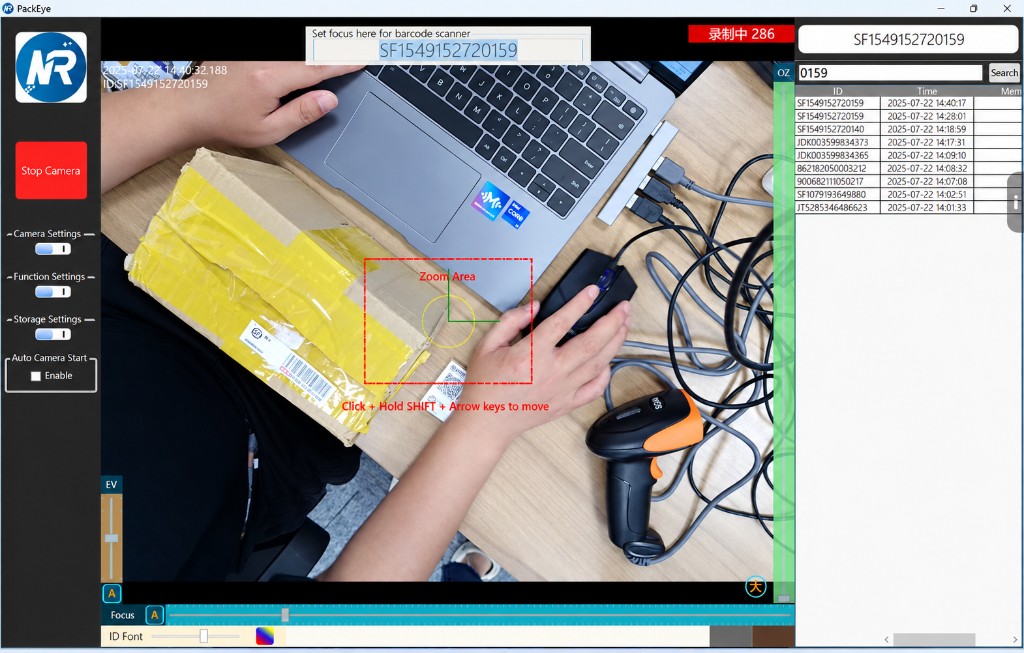
PackEye interface with packing footage and reference search

PackEye Software

Index packing footage by order or waybill reference for faster retrieval. Retrieve footage using the full reference number or the last four digits/characters, together with the date or time range.

See video traceability
Operator packing orders at a modular lean tube packing workstation

Packing Workstation

Organize equipment, packaging materials and daily packing tasks around the operator with a modular lean tube bench.

Workstation details
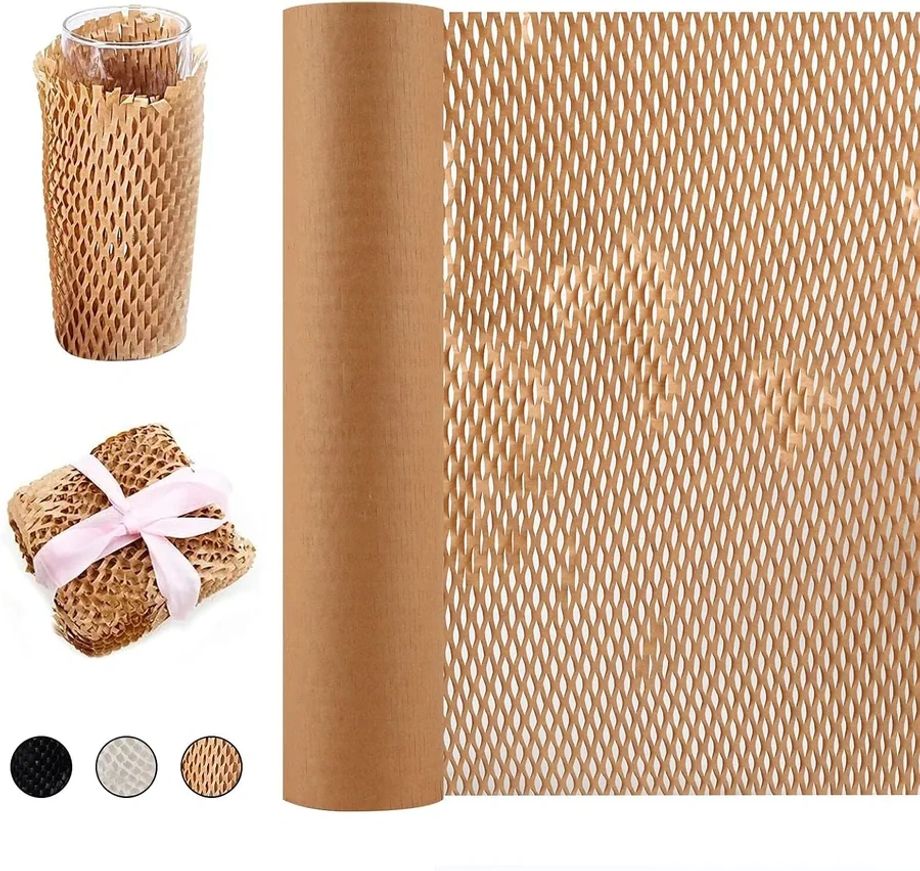
Honeycomb kraft paper roll and wrapped fragile items

Protective Packaging

Use honeycomb paper, inflatable air-cushion film or recycled cardboard cushioning according to the product being packed.

Packaging materials

Packing Station Camera and Packing Video Software

When a customer reports a missing, incorrect or damaged item, your team needs to find the relevant packing record. W8 and PackEye connect packing footage to the order or waybill reference used at the station.

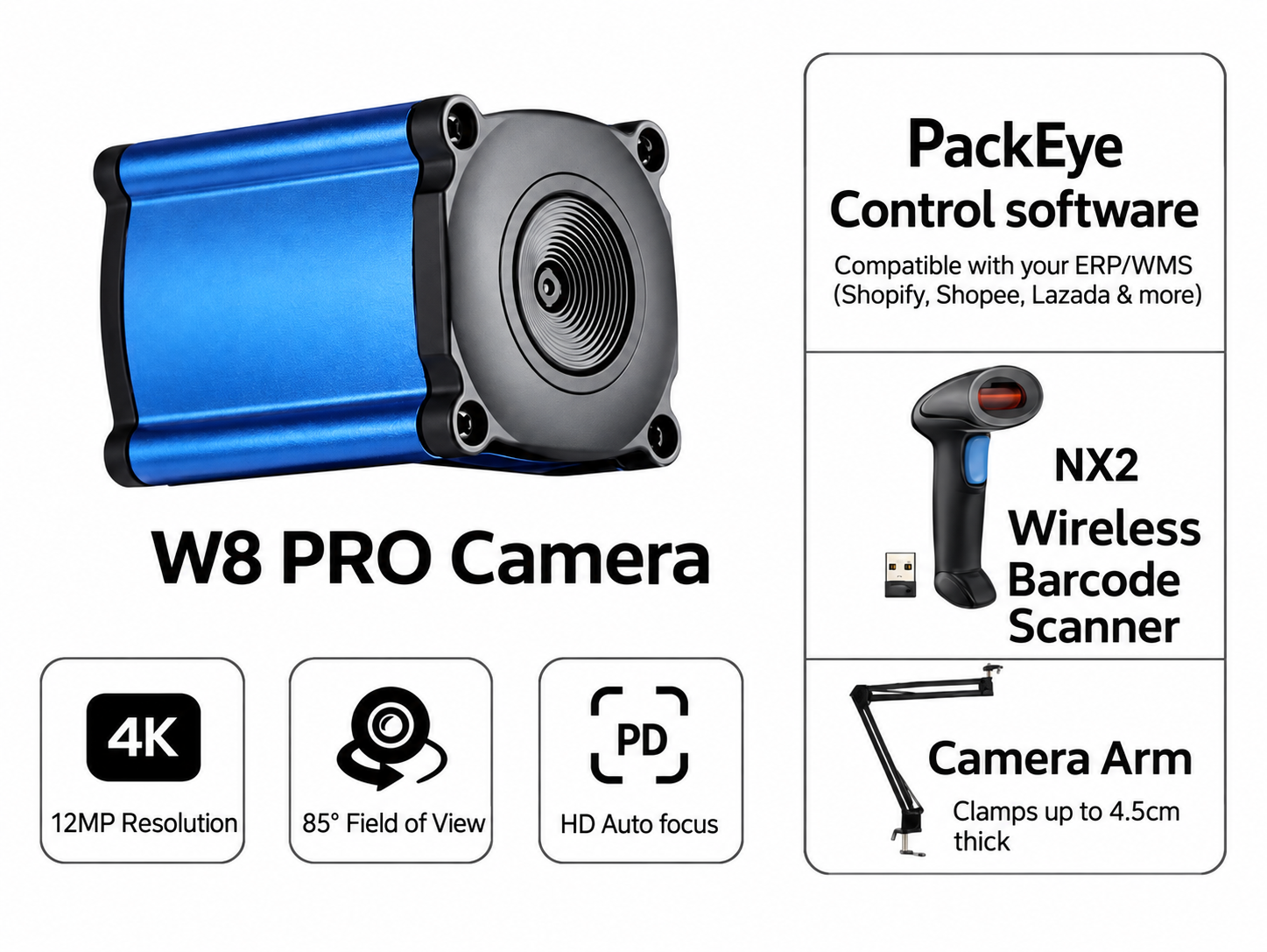
W8 PRO 12MP camera with PackEye software, an NX2 wireless barcode scanner and an adjustable camera bracket.
W8 PRO 12MP camera with PackEye software, an NX2 wireless barcode scanner and an adjustable camera bracket for capturing clear packing records.
PackEye interface with packing footage and reference search
The PackEye interface displays a live camera view, order search and timestamped recordings. Customizable settings include timestamp display, video size and resolution, zoom areas and file storage options.
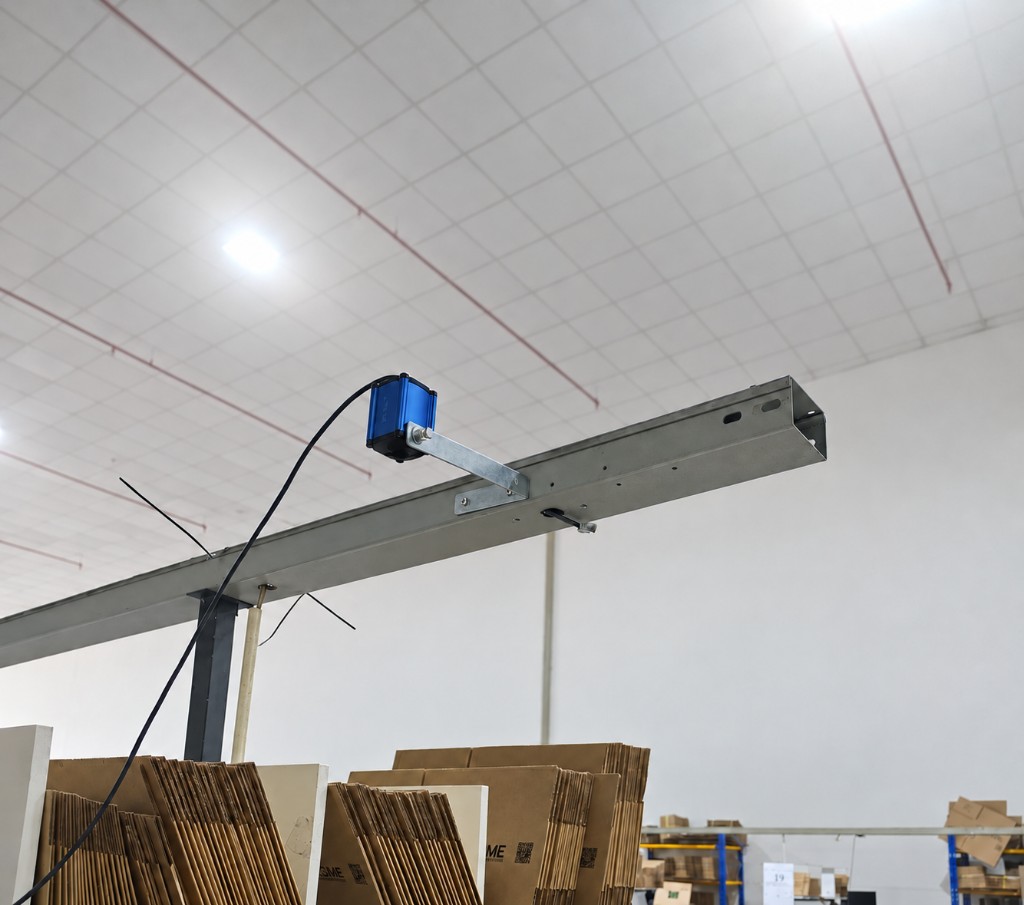
NetRay W8 camera and mounting options for overhead packing footage
The NetRay W8 packing station camera captures overhead packing footage for order verification and dispute review. Optional disc mounting brackets, floor stands and cantilever arms suit different workspace layouts.

At each packing station, the operator scans or manually enters the order or waybill number to start recording. PackEye indexes the footage by reference number and time. Authorized users can retrieve footage with the full reference number, or the last four digits or characters, together with the date or time range. A recording exists for an order only when it was started and completed.

That record is what a team uses when investigating a missing-item, wrong-item or damage claim.

What is order-linked packing video?

Order-linked packing video is footage of a packing session associated with an order or waybill reference. The reference helps your team locate the relevant recording for review. It records visible activity; it does not by itself verify the SKU or quantity.

Discuss your recording setup

Plan your first packing station

Start by confirming the order reference you scan, your camera layout and the Windows PC used at the station. PackEye is the main software offered for this workflow, with a one-time licence per camera for lifetime use.

For a quotation, tell us your station count, camera count, delivery country and how long you need to keep recordings. Ask us to confirm the included hardware, storage configuration and delivery schedule.

Request a station configuration

Does the camera identify the SKU?
No. Item matching is handled by your WMS or verification software. W8 and PackEye record the packing process.
  • W8 camera: 12MP sensor, USB powered. Windows 7/8/10/11 is the published list for the camera. Software version support is confirmed per project.
  • Video resolution and frame rate are separate from the 12MP sensor figure.
  • Recording starts from an order or waybill scan, or from manual entry
  • Footage is indexed by reference number and time
  • PackEye can detect ERP/OMS scanner input on the same Windows PC.
Download W8 Brochure (PDF)
Modular workbench for e-commerce packing

Modular E-commerce Packing Workstation

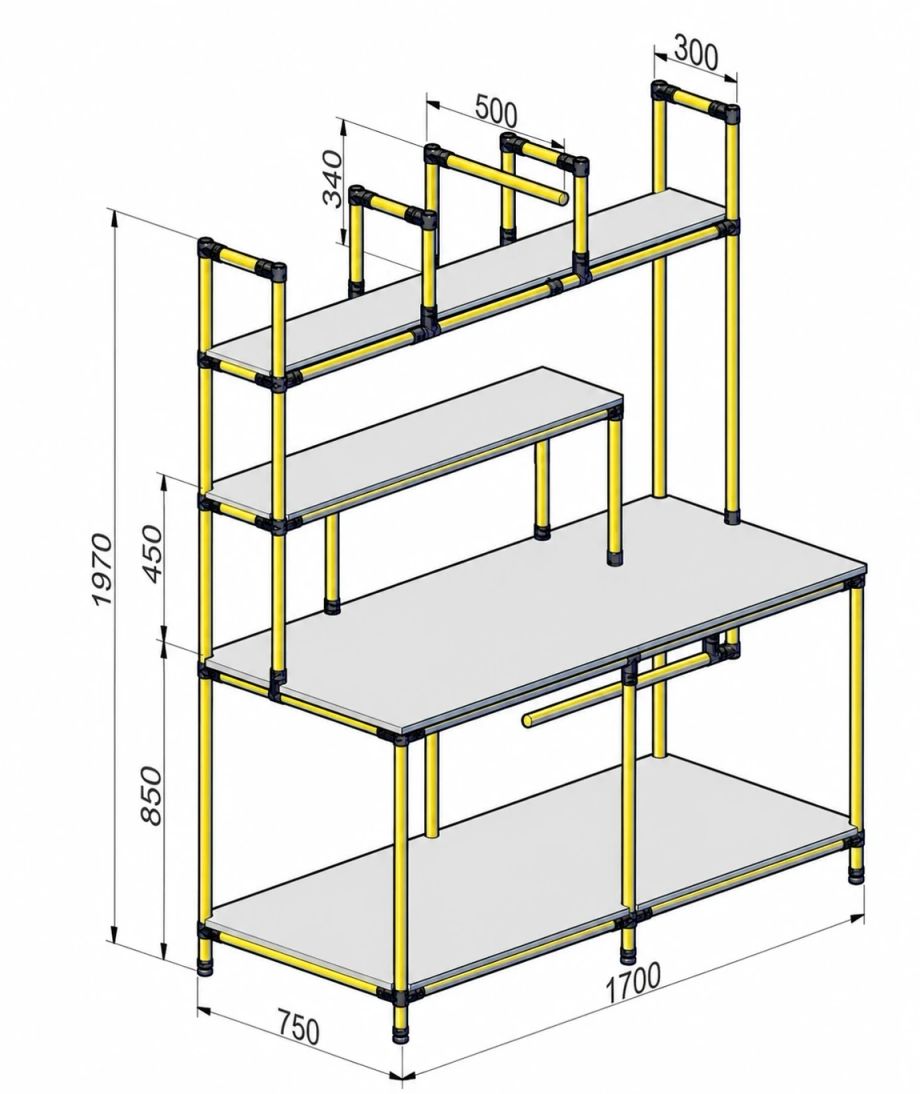
Perspective drawing of the modular lean tube packing workstation frame with dimensions in mm
Dimension drawing. Layout can be reconfigured per site.
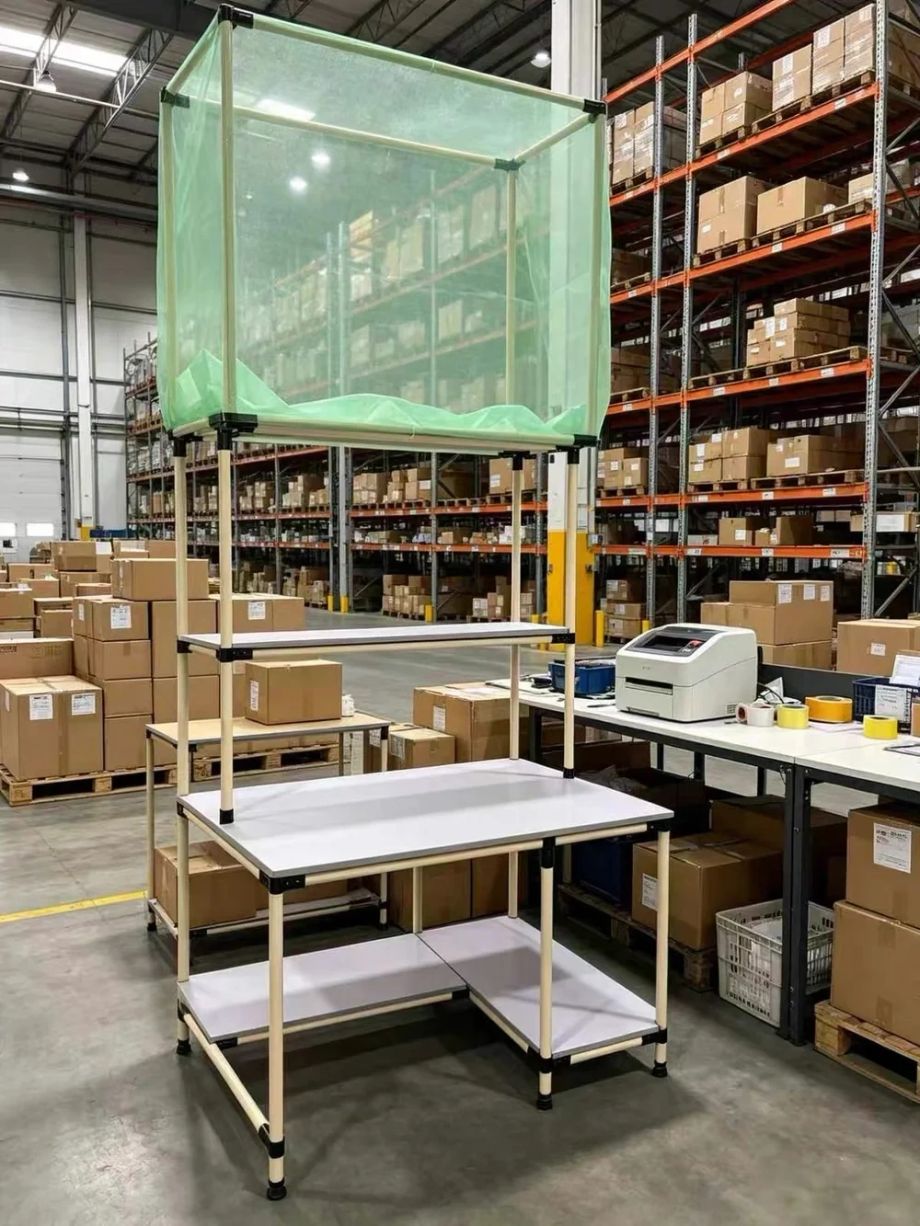
Modular packing bench with shelves and a mesh worktop, shown without scanner, camera or printer fitted
Modular bench shown without the scanner, camera and printer fitted. It is not a photo of a completed installation.

A lean tube packing workstation is a modular, customizable, lightweight workbench built from 28 mm plastic-coated steel or aluminum pipes and joint connectors. It creates an organized packing area with dedicated working and storage zones for scanning, label printing, video recording, packaging materials and completed orders.

The modular pipe-frame design combines a spacious worktop with multi-level shelves and accessory-mounting positions. Its layout can be configured around the operator's workflow, available warehouse space and required packing equipment.

  • One example configuration: 1700 × 750 mm packing surface at 850 mm working height. Worktop height and layout can be configured around your operators and packing workflow.
  • Multi-level storage for packing materials, with a dedicated lower shelf for equipment or supplies
  • Upper rails for rolls and frequently used accessories
  • Open modular structure — suitable for scanners, label printers, monitors and W8 cameras
  • Workstation dimensions and shelf layout can be customized

Packing material reuse

Cardboard Shredders

Turn suitable used cartons into protective cushioning.

NetRay X-series shredders perforate suitable used cardboard into cushioning mesh for packing. Reuse inbound cartons and prepare protective material near your packing area, with desktop and floor-standing models to suit different workspaces.

  • Put used cartons to workGive suitable inbound cardboard a second use as packing protection.
  • Prepare cushioning where you packMake cushioning near the packing area when it is needed.
  • Find a model that fitsCompare cutting widths and desktop or floor-standing formats.

Share your carton size, thickness and daily volume so we can help check the fit.

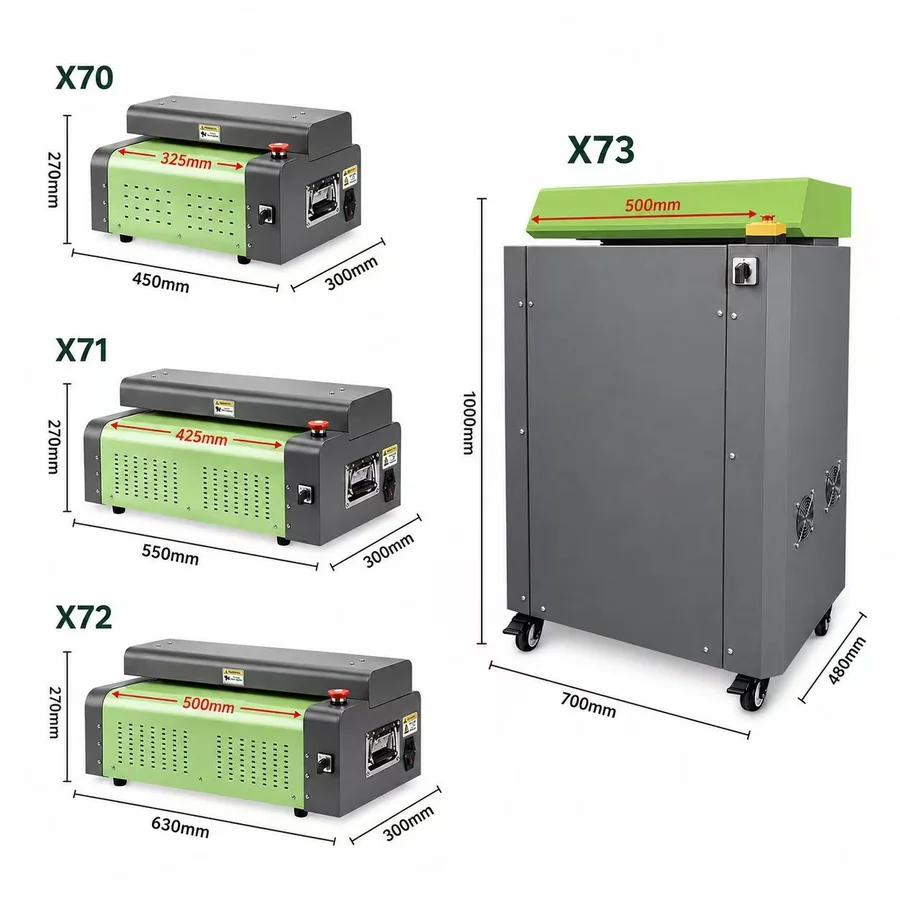
NetRay X70, X71 and X72 desktop cardboard shredders with the X73 floor-standing model and dimension annotations.
X70–X73 series: three desktop models and one floor-standing model.View model dimensions

Compare the X-series

ModelDutyCutting width / thickness / speed
X70Light325 mm / 6 mm / 3 m/min
X71Medium425 mm / 7 mm / 3 m/min
X72Medium500 mm / 7 mm / 3 m/min
X73Industrial heavy duty500 mm / 10 mm / 12 m/min

The right model depends on your cardboard and packing requirements.

See cardboard turned into cushioning

The thumbnail is loaded from YouTube. The YouTube player loads when you press play. If it will not play here, open the video on YouTube.

Protective Packaging Materials

Match the material to SKU fragility — paper-based wrap for fragile items, air cushioning for general void-fill:

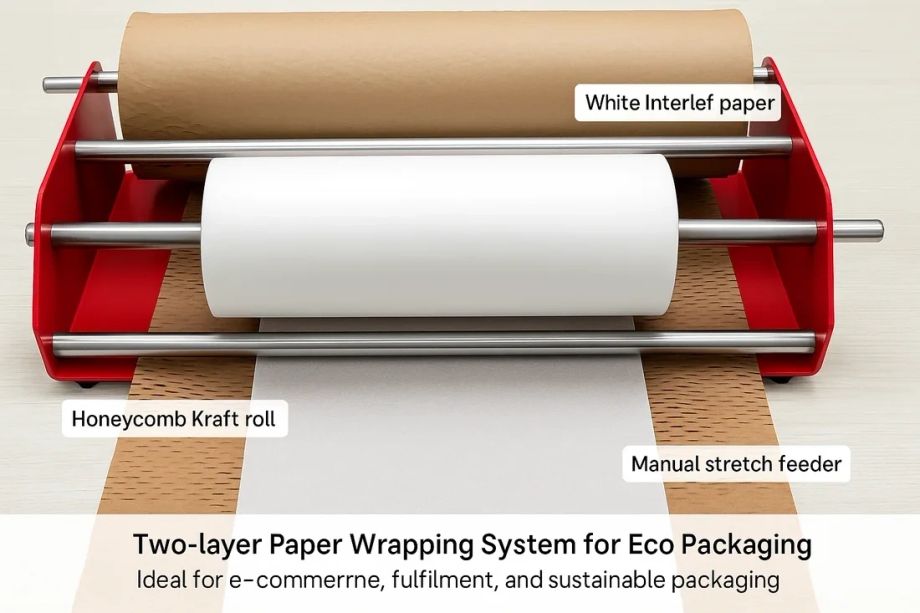
Two-layer paper wrapping dispenser with honeycomb kraft roll and white interleaf paper in use

Honeycomb paper

  • 80 gsm rolls: 30 cm × 100 m / 250 m
  • 80 gsm rolls: 50 cm × 100 m / 250 m
  • Use: wrapping, box filling, cushioning, fragile-item buffer
  • Two-layer manual dispenser available
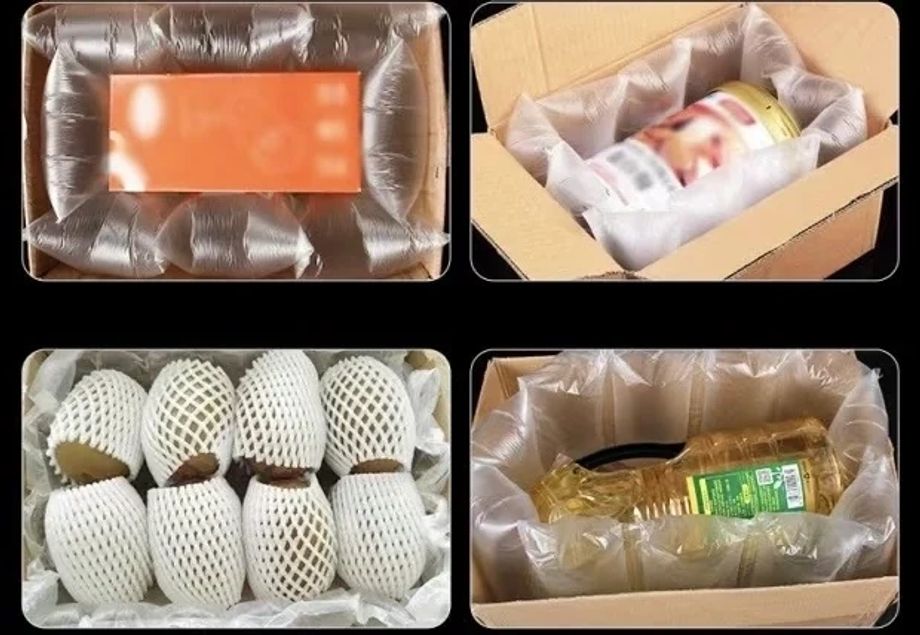
Inflatable air-cushion film and air pillows protecting products inside shipping cartons

Inflatable air-cushion film

  • Air-pillow film and inflatable bubble film
  • Small / medium / large formats; 30 cm or 40 cm width
  • Inflator available
  • Use: void fill and shock protection inside the carton
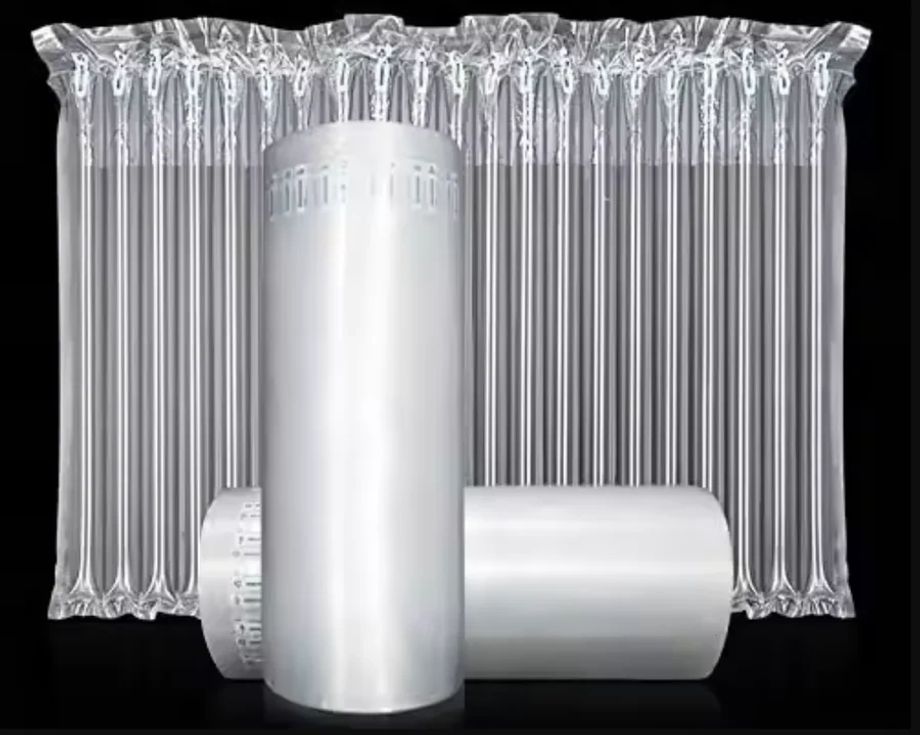
Air column roll and air column bag protective packaging for bottles and edge-sensitive items

Air column roll & bag

  • Column wrap for bottles and edge-sensitive items
  • Roll and pre-formed bag formats
  • Use: full-surround protection for single items

System Integration and Configuration

Scanner, printer, W8 camera and PackEye are configured around your order flow. The documented PackEye workflow listens for ERP/OMS scanner input on the same Windows PC. API integration and automatic order-data exchange require separate technical confirmation. Start with one station and test the recording and retrieval workflow before expanding.

Automatic packing machines → · DWS systems → · Sorting systems →

Applications and Use Cases

E-commerce fulfillment centers

High daily order counts with mixed SKU pack complexity and dispute exposure.

3PL warehouses

Client-specific requirements for order accuracy, labeling and packing.

Retail distribution centers

Store replenishment and direct-to-consumer packing from one bench.

Return & exchange processing

Video evidence of unpacking and condition at the returns bench.

Electronics & fragile-product packing

Protective materials chosen per product, with packing video when recording is used.

Multi-SKU order fulfillment

Item barcodes can be scanned before the carton is closed. Matching those scans to the order depends on the WMS or verification software in the project.

Smart Packing Station FAQ

How does packing video recording start at the station?
The operator scans or manually enters the order or waybill number to trigger video recording. PackEye indexes the footage by reference number and time, so authorized users can retrieve footage using the full reference number or the last four digits/characters, together with the date or time range.
Can PackEye integrate with our ERP or WMS?
The documented PackEye workflow listens for scanner input used by your ERP or OMS on the same Windows PC. Confirm ERP Scan Listener settings and test your scanner workflow during setup. API integration, order-data exchange and other custom requirements need separate technical confirmation.
Which protective packaging material should we use?
It depends on your product mix. Honeycomb paper suits wrapping and box filling for fragile items; inflatable air-cushion film works as general void-fill; air column bags protect bottles and edge-sensitive items; shredded inbound cartons provide low-cost cushioning. We typically match material to SKU fragility per product family.
Do I need to remove tape before using a cardboard shredder?
No. All NetRay X-series cardboard shredders (X70, X71, X72 and X73) can process cardboard with packing tape attached. We recommend removing large strips of tape to help keep the machine and the finished cushioning clean.
What cardboard thickness and width can NetRay X-series cardboard shredders handle?
The specified cutting thickness and width are: X70—6 mm thick and 325 mm wide; X71—7 mm thick and 425 mm wide; X72—7 mm thick and 500 mm wide; X73—10 mm thick and 500 mm wide. Feed speeds are 3 m/min for X70, X71 and X72, and 12 m/min for X73. Share your carton dimensions, cardboard thickness and daily volume so NetRay can help select a suitable model.
Can the workstation dimensions be customized?
Yes. The lean tube workstation is a modular pipe-frame design — worktop size, shelf levels and accessory positions can be configured around the operator's workflow, available warehouse space and required packing equipment.
Do we need the complete station at once?
No. Many customers start with one measurable bottleneck — for example a packing-station camera or handheld scanning — before expanding the configuration.
Is a packing recorder the same as a camera?
A packing recorder describes the recording workflow or system. The camera captures the scene; software associates the footage with a reference that the team can search later. Check both recording quality and retrieval before choosing a setup.
Can packing footage help investigate a missing-item claim?
It can help the team review what is visible during packing. Check the reference, footage completeness and image clarity before drawing a conclusion. Packing footage alone does not establish what happened throughout transport or delivery, and it does not guarantee a dispute outcome.
What affects the price and delivery time?
PackEye uses a one-time licence fee per camera for lifetime use. Request a configuration-based quotation covering cameras, mounts, the Windows PC, storage and any setup or integration services. Share your station count, camera count and delivery country. Equipment availability, configuration work and the shipping schedule are confirmed with your quotation.
Does PackEye connect directly to Shopify?
PackEye does not connect directly to Shopify. For the supported scan-listener workflow, Shopify orders are handled through your ERP or OMS on the same Windows PC. With ERP Scan Listener set to Always listen, PackEye detects the scanner input to trigger recording. Confirm your scanner and ERP workflow during setup; this does not imply automatic order-data synchronisation.
How do I start and stop a packing recording?
A barcode scan triggers recording. Click "Stop camera" in the software interface, or scan the EndRecord barcode to stop, or let the configured recording limit end the clip. The current documented maximum-duration setting is up to 300 seconds. Confirm the settings against your installed PackEye version.
Can recordings be stored on a NAS?
A NAS configuration is available. Recording cameras must not write directly to the NAS in this configuration. Confirm the data-centre setup, storage capacity and retention policy with NetRay before deployment. Cloud storage and remote access require separate confirmation.
Which PC and recording settings should I plan for?
For the documented setup, plan a Windows 10 or later desktop PC with an Intel Core i3 10th generation or above, at least 8 GB RAM and sufficient USB ports. A 2 TB local drive per recording terminal is recommended. Suggested W8 recording settings are 2592 × 1944 at 30 fps or 1920 × 1080 at 30 fps; 4000 × 3000 MJPG is rated at 15 fps. Test the full camera configuration before rollout.

Build Your Smart Packing Station

Tell us about your packing volume, available space and required equipment. NetRay will recommend a suitable workstation configuration and integration approach.

Add station details (optional — speeds up the answer)

We will reply with a suggested configuration direction, the technical details we still need from you, and whether a demonstration makes sense. If something is not a fit, we will say so.

We use your details to respond to your enquiry. See our Privacy page.

Prefer a message? Talk to a solution specialist on WhatsApp.