
Warehouse Automation FAQ
Practical answers on DWS, PDA scanning, parcel sorting, packing evidence and WMS integration.
For warehouse operators, 3PLs, fulfillment centers and courier hubs.
ROI & Getting Started
What problems can warehouse automation solve?
Automation helps most where work is repetitive, time-sensitive or hard to audit — manual measuring, weighing and barcode capture, picking verification, packing evidence and sorting. Whether it pays off depends on your volume, shifts and error rate.
Open the WISE self-assessmentDo we need a large project to start?
No — many operators start with one measurable bottleneck and expand later. A good first step depends on where your data breaks today: outbound DWS, a packing-station camera, or handheld terminals for scan discipline.
Open the WISE self-assessmentHow do we assess ROI?
ROI usually combines labor hours saved, reduced rework, higher throughput, better carrier-billing accuracy and clearer management visibility. Share your volumes, shifts and main error type for an initial discussion.
Start an ROI discussionDWS & Data
What is a DWS system?
DWS means Dimension, Weigh and Scan — it captures a parcel's size, weight and barcode in one pass and can connect those records to your WMS, OMS, carrier or billing workflow.
Explore DWS systemsStatic or dynamic DWS — which suits us?
Static suits an operator placing one parcel at a station; dynamic suits parcels moving continuously on a conveyor at higher throughput.
Discuss your throughputCan DWS data connect to our WMS or ERP?
Yes — DWS records can connect through an agreed integration method. We review barcode triggers, returned fields, exceptions and API vs file transfer before confirming.
Discuss your integrationWhat happens if a barcode can't be read or a parcel is outside range?
A reliable workflow needs an exception path: re-scan, manual entry, operator alert, reject lane or exception record — depending on your process.
Talk through exceptionsPDA & Scanning
Why an industrial PDA instead of a phone?
Industrial PDAs are built for repetitive scanning, warehouse Wi-Fi, device management and battery rotation in demanding environments.
Check PDA optionsCan the PDA work with our WMS or Android app?
An Android PDA can often run the app you already use, and a WMS can often be put on the device. That compatibility depends on the Android version, what the app requires, and your security policy. MDM is how the devices are enrolled and managed. It is not the connection that sends scan data into the WMS. Both are checked before a model is recommended.
Ask a compatibility questionHow do we choose the right barcode scanner?
It depends on barcode type, scan distance, label condition and how operators scan. Share barcode samples and typical scan distance and we match the right reader.
Check scanner optionsHow can forklift operators scan the correct QR code when rack labels are close together?
When several rack-location QR codes are grouped together, a PDA may read a neighbouring code before the operator has finished aiming. First check the scanner settings: on supported configurations, a “Scan after aim” option lets the operator aim before decoding.
Larger QR codes and clearer spacing can also make individual locations easier to target. Test the setup from the operator’s normal scanning position before changing all your labels.
Share your PDA model, a photo of the rack labels and your typical scanning distance. We can help check the settings and label layout before recommending different hardware.
Discuss your scanning setupCan the MC62 PDA be used in a cold room or freezer?
The MC62’s published operating range is −20°C to +50°C under non-condensing conditions. However, a temperature rating alone does not confirm suitability for a particular cold-room or freezer workflow.
Selection also depends on how long the device stays inside, how often it moves between warm and cold areas, and the required battery runtime. For prolonged freezer work or frequent temperature changes, we recommend evaluating a dedicated cold-storage PDA with suitable temperature and condensation protection.
Tell us your actual cold-room temperature, time spent inside per visit and frequency of entry. We will help assess the appropriate model and configuration.
Explore cold-storage PDA optionsSorting, Packing & Getting Started
When does a sorting system make sense?
A sorting system helps when manual destination allocation causes delay, errors, labor pressure or peak congestion.
Explore parcel sortingCan you work with our existing conveyor or warehouse system?
In many projects, the goal is to improve one part of an existing workflow rather than replace the whole line. A short line video and layout are usually enough for an initial review.
Send a line video for reviewWhat can a packing-station camera do?
When configured correctly, a packing station can create visual evidence linked to an order or tracking ID — useful for quality checks and dispute investigation.
See smart packingCan the automatic packing machine work with our WMS or ERP?
The FPM-600 and PEM-500 can work with your WMS or ERP to combine order-linked label printing, bag preparation and sealing. The connection method depends on your system and packing workflow.
In a workstation-based setup, your team accesses the WMS or ERP on the machine’s computer, much as they would on a regular PC. A barcode scan can retrieve or release an order, and the label printer is configured through the computer’s printing setup. The operator places the items into the opened bag.
Scan verification before label printing is optional; retrieving an order by barcode does not itself verify every item. If API integration is needed, our technical team can review your API documentation before confirming compatibility and scope.
Share your WMS or ERP name and current scan-and-print process so NetRay can confirm a suitable setup.
Explore automatic packing machinesHow can we start a project with NetRayTech?
Share your workflow, volume, parcel range, a layout or line video, and the outcome you want. We recommend whether a single station, phased pilot or broader solution fits.
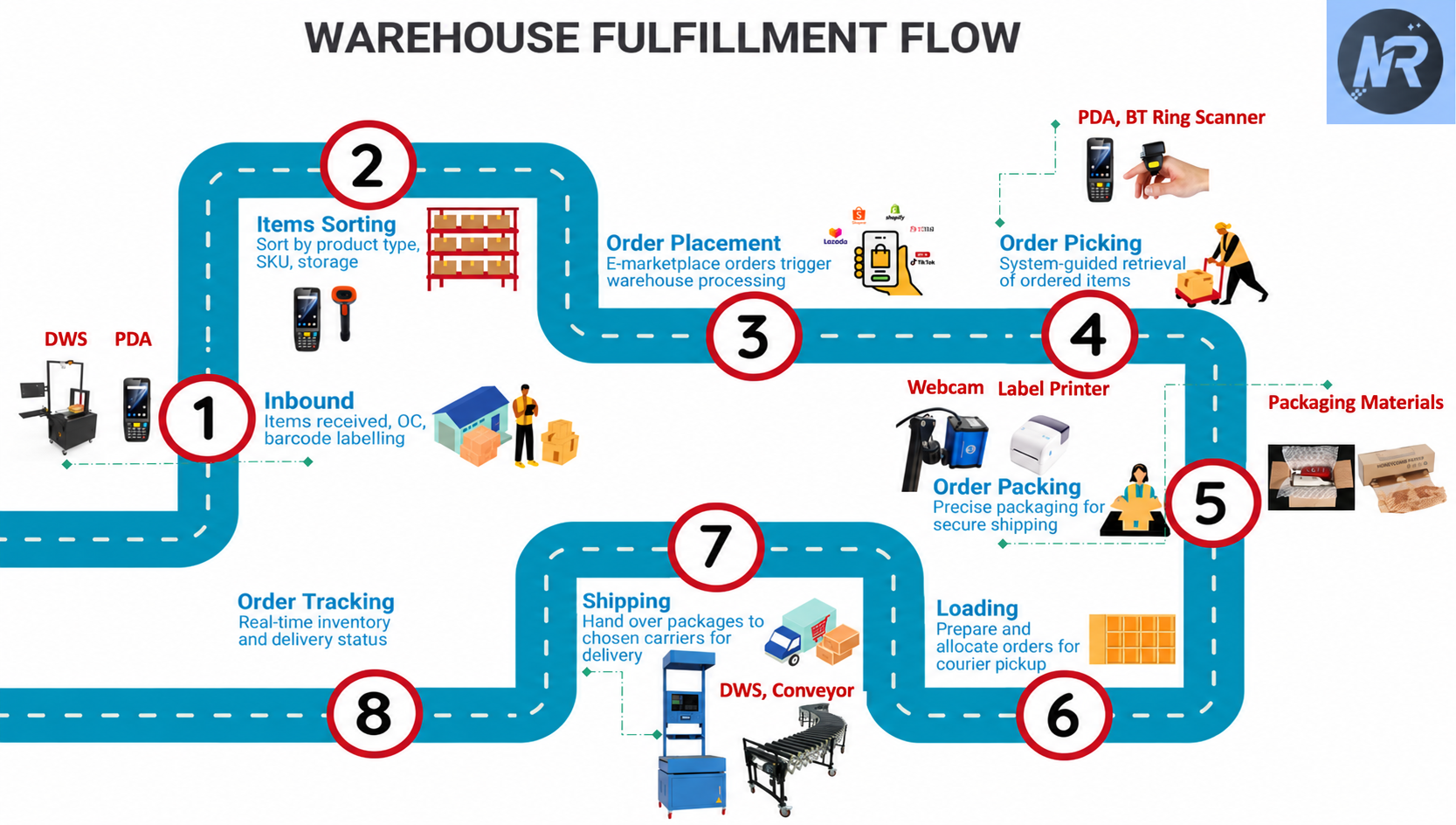
Start the conversationWhere NetRay fits your warehouse workflow
The same sequence, in text, so it can be read without the diagram:
- Inbound — items received, QC and barcode labelling (DWS, PDA)
- Item sorting — by product type, SKU and storage
- Order placement — marketplace orders start warehouse processing
- Order picking — system-guided retrieval (PDA, Bluetooth ring scanner)
- Order packing — webcam, label printer and packaging materials
- Loading — prepare and allocate orders for courier pickup
- Shipping — hand over to the chosen carrier (DWS, conveyor)
- Order tracking — inventory and delivery status
Not sure which solution fits your workflow?
Share your daily volume and peak-hour throughput, parcel range, system name and a short line video. We will help identify the first workflow worth improving.
Before you contact us, it helps to have:
- Daily volume and peak-hour throughput
- Min / max parcel size and weight
- Current WMS / ERP / OMS
- Workflow video or layout
- Main delay, error or dispute to reduce